August 20, 2026 | By jesse
Creators need more than impressive peak specifications. A premium laptop for creative work should combine a high-performance GPU, enough VRAM and system memory, fast NVMe storage, an accurate display, and cooling designed for extended sessions.
The right configuration depends on whether you edit video, render 3D scenes, stream, develop games, run local AI tools, or balance professional work with gaming. This guide explains what to prioritize when comparing ORIGIN PC gaming and workstation laptops in 2026.
What Should Creators Look for in a Premium Laptop?
For most creators, a modern NVIDIA GeForce RTX laptop GPU, 32GB to 64GB of RAM, and fast NVMe storage provide a strong foundation. Large 3D projects, complex effects, local AI workloads, and demanding multitasking may benefit from 24GB of VRAM and up to 128GB of system memory.
Do not choose by the GPU name alone. Laptop GPUs with the same model name can operate at different power levels. Maximum total graphics power, cooling capacity, chassis size, and real-world testing all influence performance during an extended render or export.
As a starting point:
- Choose 32GB of RAM for photo editing, HD production, and lighter 4K projects.
- Choose 64GB for layered 4K timelines, streaming, 3D rendering, and heavy multitasking.
- Consider 128GB for large 3D scenes and memory-intensive professional projects.
- Look for at least 8GB of VRAM for modern creative applications.
- Prioritize additional VRAM for complex 3D scenes, high-resolution textures, and compatible AI workloads.
- Use fast NVMe storage for applications, cache, source media, and active projects.
Gaming Laptop or Workstation Laptop: Which Is Right for Creators?
Quick Model Recommendations
- Maximum performance: EON18-X or NS-18
- Performance and portability: EON16-X or NX-16
- Lightweight mobility: EON15-S or NSL-16
Gaming and workstation laptops can both provide the performance needed for creative work. The better choice depends on how the system will be used.
A gaming laptop is a strong option for creators who want one system for professional applications and high-end gaming. These systems combine powerful CPUs and GPUs with high-refresh displays and customizable configurations.
A workstation laptop is positioned around professional productivity and demanding creative or technical workloads. Depending on the model, a workstation may place greater emphasis on memory capacity, storage, color calibration, portability, or long-term business use.
Creators can explore both ORIGIN PC gaming laptops and ORIGIN PC workstation laptops before choosing a configuration.
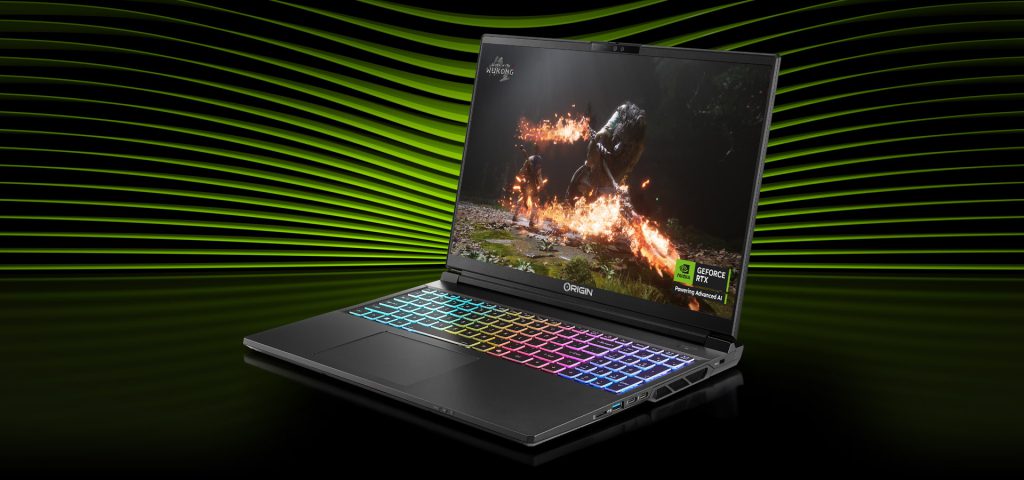
Which ORIGIN PC Gaming Laptop Is Best for Creators?
EON18-X: Maximum Gaming and Creative Performance
The EON18-X is designed for creators who prioritize high-end local performance over minimizing size and weight.
It can be configured with an NVIDIA GeForce RTX 5090 Laptop GPU featuring 24GB of GDDR7 VRAM, up to 128GB of DDR5 memory, and high-capacity M.2 SSD storage. Its 18-inch 3840 x 2400 display has a 240Hz refresh rate for detailed creative work and high-end gaming.
The EON18-X is a strong fit for large 3D scenes, GPU rendering, effects-heavy video projects, game development, local AI workloads, and gaming from one desktop-style system.
EON16-X: Performance and Portability Combined
The EON16-X offers a middle ground between desktop-style performance and everyday portability.
Available with high-end NVIDIA GeForce RTX graphics and up to 64GB of DDR5 memory, it is suited to 4K editing, 3D rendering, streaming, and gaming. Its 16-inch QHD+ high-refresh display provides a more travel-friendly footprint than an 18-inch system.
EON15-S: Thin and Light Creative Performance
The EON15-S is built for creators who value mobility. It combines an NVIDIA GeForce RTX 5070 Laptop GPU with up to 64GB of DDR5 memory in a lightweight chassis.
Its QHD+ OLED display provides strong contrast for editing, design, entertainment, and gaming. The EON15-S is a practical option for photographers, videographers, students, and other creators who regularly work away from a desk.
Which ORIGIN PC Workstation Laptop Is Best for Creators?
NS-18: Professional Performance for Demanding Projects
The NS-18 is designed for creators and professionals who need maximum local performance.
It supports an NVIDIA GeForce RTX 5090 Laptop GPU, up to 128GB of DDR5 memory, and high-capacity M.2 SSD storage. Its 18-inch 3840 x 2400 display provides a large workspace for editing, rendering, multitasking, and professional applications.
The NS-18 is a strong option for 3D artists, video professionals, developers, and creators working with large projects or several demanding applications at once.
NX-16: Portable Workstation Performance
The NX-16 balances high-end workstation performance with a more portable 16-inch design.
It supports NVIDIA GeForce RTX 50 Series graphics and features a 2560 x 1600 high-refresh display with X-Rite Pantone color calibration. This makes it a compelling option for creators who want powerful graphics, strong display performance, and greater portability than an 18-inch workstation.
Creators whose work prioritizes mobility, productivity, battery life, and durability over maximum GPU performance can also consider the NSL-16.
How Much Memory and Storage Do Creators Need?
Adobe recommends 32GB or more of RAM for editing 4K video in Premiere, but the right configuration depends on the complete workflow.
Choose 32GB for standard photo editing, HD production, and lighter 4K projects. Choose 64GB for layered 4K timelines, streaming, 3D rendering, and running several creative applications at once. Consider 128GB for large 3D scenes, complex simulations, or especially memory-intensive professional projects.
Fast NVMe storage is equally important. Creators should plan capacity for applications, cache files, source media, active projects, recordings, games, and backups.
Using separate drives for the operating system, cache, and media can improve organization and prevent one drive from handling every part of the workflow.
What Makes a Laptop Good for 3D Rendering?
A strong 3D rendering laptop needs GPU performance, enough VRAM for scene data, sufficient system memory, fast asset storage, and cooling suited to extended workloads.
Blender, V-Ray, Unreal Engine, and similar applications can keep the GPU busy for much longer than a short gaming benchmark. This makes cooling and sustained performance especially important.
The RTX 5090 Laptop GPU includes 24GB of GDDR7 memory, which can help with large scenes, high-resolution textures, complex geometry, and GPU-accelerated creative workloads.
Creators who want maximum performance and memory capacity should consider the EON18-X or NS-18. Those who need high-end graphics in a more portable system may prefer the EON16-X or NX-16.
Can a Premium Laptop Handle Video Editing and Streaming?
Yes. A properly configured laptop can edit video, encode a stream, manage overlays, and run communication tools at the same time.
The GPU can accelerate compatible effects and handle video encoding. The CPU manages decoding, audio, browser sources, background applications, and other production tasks.
For this mixed workload, 64GB of RAM is a practical target. Fast NVMe storage can also keep media, cache, and recordings from competing for access to one drive.
Creators should check connectivity for capture devices, external storage, audio equipment, networking, and additional displays.
Which Display Features Matter for Creators?
A creator display should be evaluated for color gamut, color accuracy, calibration support, brightness, contrast, uniformity, resolution, and HDR capability.
Refresh rate remains valuable for gaming and smooth interaction, but it should not replace color performance as the main criterion for professional visual work.
The EON18-X and NS-18 provide large 3840 x 2400 displays for creators who want maximum screen space. The EON16-X and NX-16 offer more portable QHD+ displays, while the EON15-S adds OLED contrast in a thin and light design.
Creators using color-critical workflows should also consider a calibrated external monitor or reference display appropriate for their delivery format.
Premium Creator Laptop Buying Checklist
Before choosing a gaming or workstation laptop, check the following:
- Primary creative applications and workloads
- GPU model, VRAM, power configuration, and cooling
- System memory for current projects and future growth
- Storage capacity for applications, cache, media, projects, and games
- Display color accuracy, brightness, contrast, and calibration support
- Connectivity for displays, storage, networking, and peripherals
- Portability compared with cooling and performance capacity
- Warranty coverage and lifetime support
Frequently Asked Questions
How much RAM should a creator laptop have in 2026?
Choose at least 32GB for serious 4K editing. Consider 64GB for heavier timelines, streaming, 3D rendering, and multitasking, or 128GB for large and memory-intensive projects.
Which ORIGIN PC laptop is best for 3D rendering?
The EON18-X and NS-18 are strong choices for creators who prioritize GPU performance, VRAM, memory capacity, and large displays.
Which ORIGIN PC laptop is best for traveling creators?
The EON15-S is a lightweight gaming and creative option. The NX-16 provides more workstation performance in a portable design, while the NSL-16 emphasizes mobility and professional productivity.
Should creators choose a gaming laptop or workstation laptop?
Choose a gaming laptop if the system will be used for both creative applications and high-end gaming. Choose a workstation laptop if professional productivity, memory, storage, color calibration, or business use is the priority.
Ready to build a laptop around your creative workflow? Compare ORIGIN PC gaming laptops and ORIGIN PC workstation laptops to find the right balance of performance, portability, and creative capability.
PakarPBN
A Private Blog Network (PBN) is a collection of websites that are controlled by a single individual or organization and used primarily to build backlinks to a “money site” in order to influence its ranking in search engines such as Google. The core idea behind a PBN is based on the importance of backlinks in Google’s ranking algorithm. Since Google views backlinks as signals of authority and trust, some website owners attempt to artificially create these signals through a controlled network of sites.
In a typical PBN setup, the owner acquires expired or aged domains that already have existing authority, backlinks, and history. These domains are rebuilt with new content and hosted separately, often using different IP addresses, hosting providers, themes, and ownership details to make them appear unrelated. Within the content published on these sites, links are strategically placed that point to the main website the owner wants to rank higher. By doing this, the owner attempts to pass link equity (also known as “link juice”) from the PBN sites to the target website.
The purpose of a PBN is to give the impression that the target website is naturally earning links from multiple independent sources. If done effectively, this can temporarily improve keyword rankings, increase organic visibility, and drive more traffic from search results.